The brief
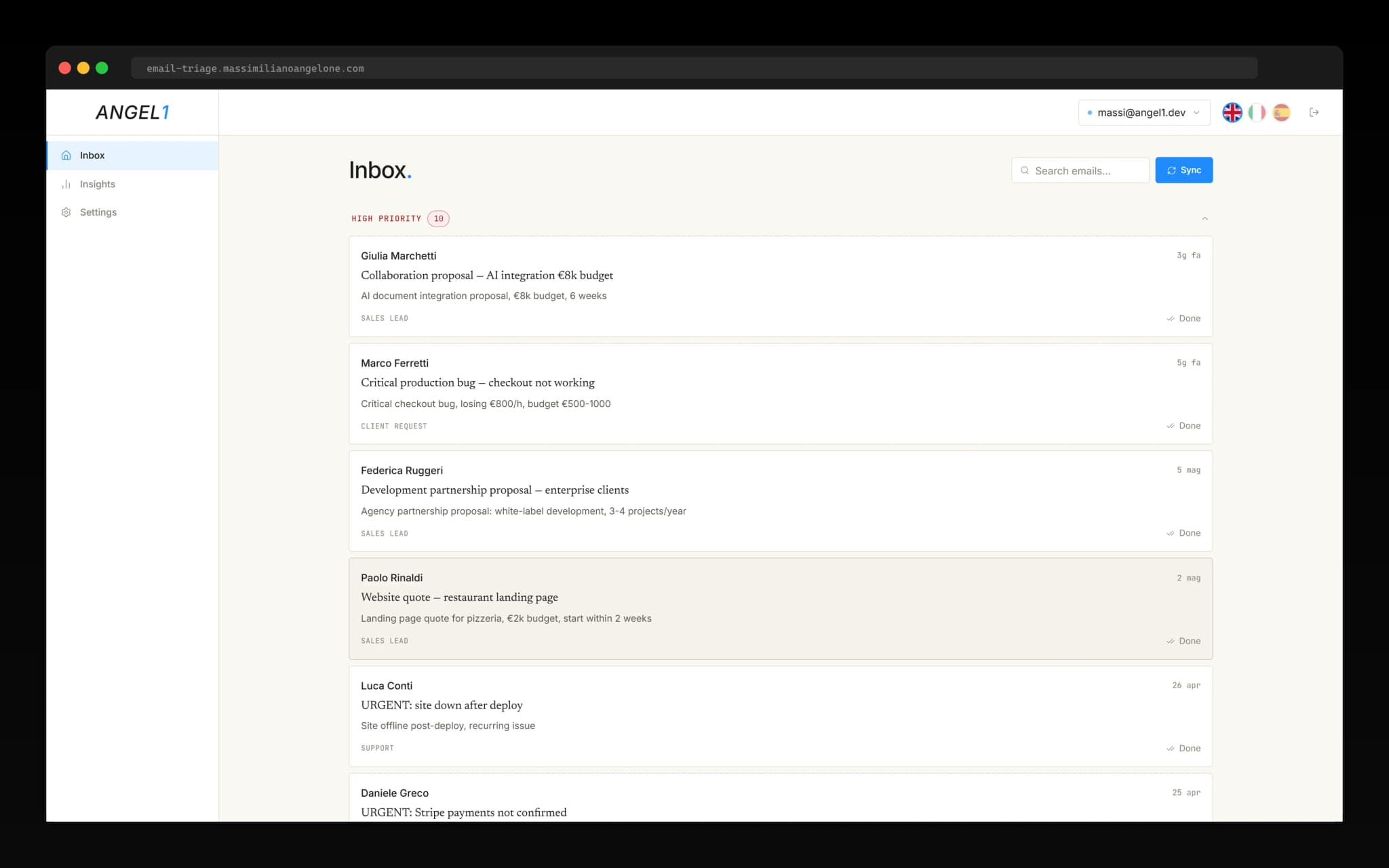
A solo founder, three Gmail accounts, no team to delegate to. Personal inbox, work inbox, support inbox — all collapsing into the same daily attention budget. Newsletters next to real client requests, sales pitches next to billing receipts, all with identical visual weight. The ask wasn't to reduce volume, it was to make the volume legible: classify automatically, surface what matters, draft replies for what's worth replying to, and do it across all three accounts at once.
This was built as a portfolio engagement targeting that workflow — Gmail API integration is real, the classification pipeline is real, the streaming reply generation is real. Mock mode is available for demo without OAuth, but the production path uses live Gmail.
Real client engagements are covered by NDA — references available on request.
Architecture
Next.js 16 App Router on Vercel. NextAuth with the Supabase adapter for session management. Google OAuth flow for Gmail authorization with gmail.readonly and gmail.send scopes. The googleapis library handles the actual API calls. Supabase stores accounts, settings, and the synced email metadata. OpenAI gpt-4o-mini for classification and reply generation. Recharts for the analytics views.
Multi-account support is the architectural spine. The gmail_accounts table tracks each connected mailbox, scoped to the user. An AccountContext hook on the client manages the active account and the switch. Three mock accounts ship in the seed — massi@angel1.dev, work@angel1.dev, support@angel1.dev — each with localized email content. Switching account in the UI reloads the inbox view, the rules, and the analytics, all scoped to that account ID.
The classification pipeline
Eight categories: client_request, sales_lead, internal, newsletter, notification, support, invoice, other. Four priorities: high, medium, low, spam. The matrix gives thirty-two possible buckets, but in practice email distributes heavily into a handful — most newsletters land low, most client requests land high, most invoices land medium, and so on.
Classification rules live in users_settings.classification_rules as a JSONB column keyed by account ID. This was the right call: rules are inherently per-account because a sales-lead pattern that matters in the work inbox is noise in the personal one. Rules are evaluated alongside the model output — explicit rules win over model classification when both apply. That gives the user a deterministic override path for the patterns they already know about.
Streaming reply generation
The /api/emails/[id]/suggest-reply route returns a ReadableStream with Server-Sent Events. The client component EmailDetail.tsx consumes the stream with a streamReply() helper, rendering tokens as they arrive into a draft area. The user can edit the draft inline before sending — the model is suggesting, not committing.
Streaming was the right call here for the same reason it's right in chat interfaces: a reply that takes six seconds to generate feels broken if it appears all at once at second six, and feels alive if the first words appear at second one. The cost is the same. The perceived latency is half.
Analytics in three languages
The /app/insights page renders five views: stacked bar of daily volume by priority (high red, medium amber, low gray), pie chart of category distribution, top senders with priority-coded color, key counters (totals, percent handled, spam count, average urgency in hours), and time-window filters for seven, thirty, and ninety days. All of it on Recharts, styled to match the dark theme.
The localization runs deeper than the UI labels. Mock email bodies are stored with parallel columns — subject_en, subject_it, subject_es, body_en, body_it, body_es — so the demo experience in each language uses content that sounds native, not translated. That decision adds complexity to the seed pipeline but pays off the first time a Spanish-speaking founder opens the demo and sees a sales pitch in Spanish, not in awkwardly-translated English.
What I'd do differently
The rules engine is too forgiving. Today, conflicting rules don't surface to the user — the last-defined rule wins silently. For a personal triage tool that's fine. For a tool a team would share, that's a footgun. A rule conflict viewer is on the list.
No reply tone control yet. The streamed reply uses a default tone derived from the original email. There's no user control to push it formal, casual, or curt. A simple slider would do most of the work. I cut it for scope.
Token usage isn't surfaced in the UI. It's logged server-side, but there's no view that tells the user you've consumed N tokens this week, here's the cost. For a solo tool the accounting matters less than for a multi-tenant SaaS, but a small cost panel is a one-day add and a real piece of trust.
What's next
A unified inbox view that merges the three accounts into a single chronological stream with account-of-origin badges. Smart digest — once a day, the tool drafts a summary of what arrived in the low-priority bucket so it doesn't get ignored entirely. And a small Chrome extension that lets you trigger triage on a single message from the Gmail UI itself, without leaving the inbox.
Live at email-triage.massimilianoangelone.com · Code on GitHub